Browser Extension
Edit your sites by describing changes while you browse them. Open the panel on any page, say what you want changed, typing or dictating, and copy a ready-made prompt to paste into a local AI agent (e.g. Claude Code in your site's repo) to make the edit.
What it looks like
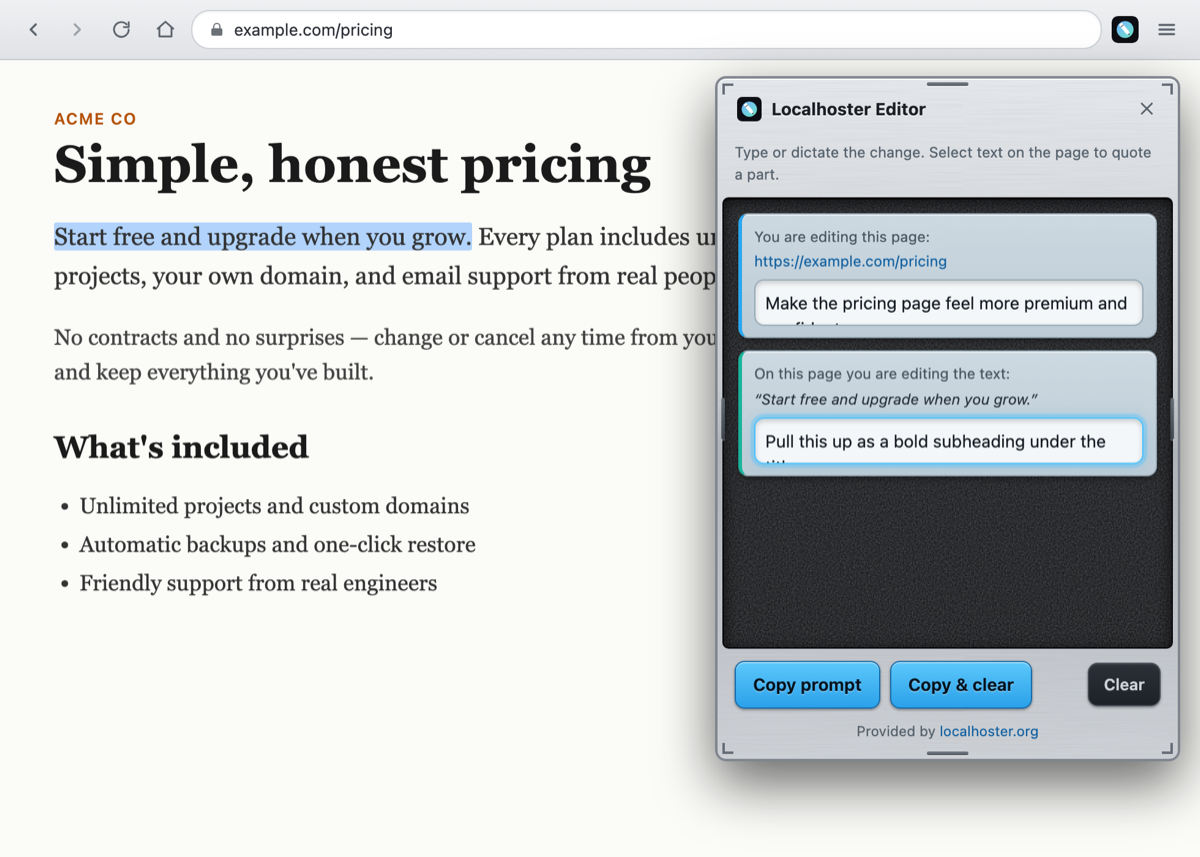
The floating panel sits over the live page, dependency-free, and isolated from the site's own styles so it always looks the same. Voice is just your operating system's dictation typing into the box, so there's no microphone permission and no speech engine.
What it does
Describe the change
Click the toolbar button to open a panel on the current page. Type or dictate the overall change. The panel carries the page's URL, so an agent in your repo knows exactly which site folder to edit.
Quote a specific part
Select any text on the page and a block appears quoting it, with its own box for what should change about that part. Re-select before typing to refine it; type to commit and move on.
Copy a prompt
One click assembles everything (the page, your instructions, and each quoted selection) into a single prompt on your clipboard, ready to paste into a local AI agent.
Stays out of the way
The panel is isolated from the page's styles, takes over selection only while it's open, and can be moved and resized from any edge. It works on any site, including your live ones.
Install it
It's an unpacked extension, no store, no build step. Grab it and load it in developer mode.
Chrome / Edge / Brave
- Unzip the download, you'll get an
extension/folder. - Open
chrome://extensionsand turn on Developer mode (top-right). - Click Load unpacked and choose the
extension/folder. - Pin localhoster editor from the puzzle-piece menu so its button is visible.
Firefox
- Go to
about:debugging#/runtime/this-firefox. - Click Load Temporary Add-on… and pick
extension/manifest.json.